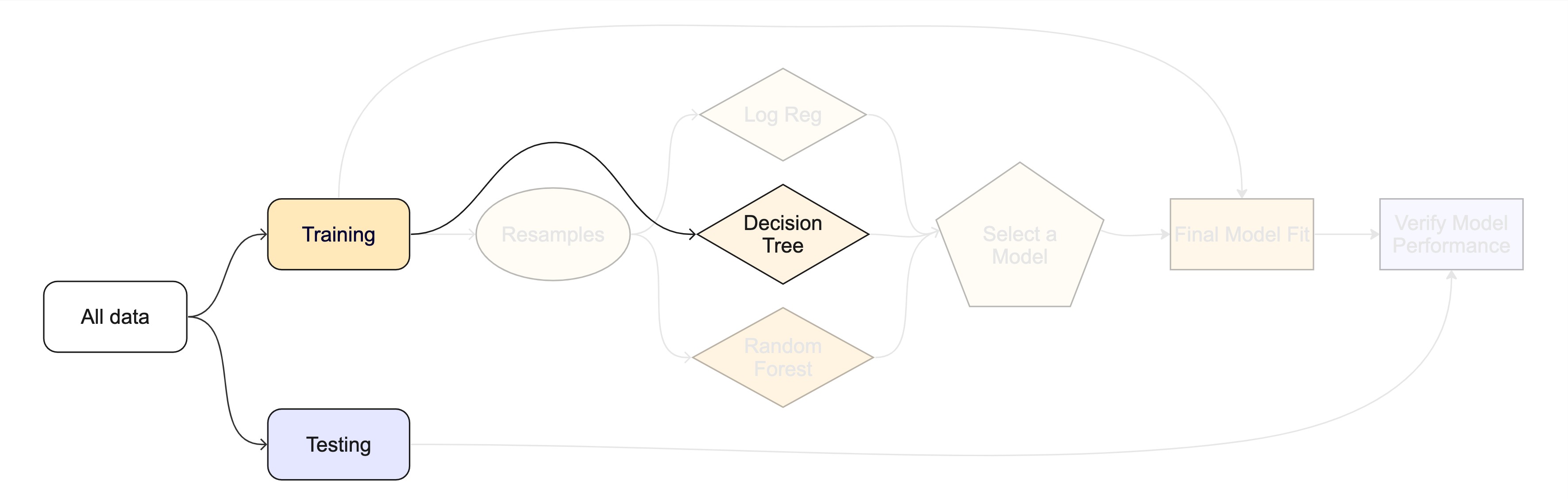
3 - What makes a model?
Practical Machine Learning with tidymodels
Your turn

How do you fit a linear model in R?
How many different ways can you think of?
lmfor linear modelglmnetfor regularized regressionkerasfor regression using TensorFlowstanfor Bayesian regressionsparkfor large data setsbruleefor regression using torch
To specify a model ![]()

- Choose a model type
- Specify an engine
- Set the mode
To specify a model ![]()
To specify a model ![]()
- Choose a model type
- Specify an engine
- Set the mode
To specify a model ![]()
To specify a model ![]()
To specify a model ![]()
- Choose a model type
- Specify an engine
- Set the mode
To specify a model ![]()
To specify a model ![]()
All available models are listed at https://www.tidymodels.org/find/parsnip/
To specify a model ![]()
- Choose a model type
- Specify an engine
- Set the mode
Your turn
Run the tree_spec chunk in your .qmd.
Edit this code to use a logistic regression model.
All available models are listed at https://www.tidymodels.org/find/parsnip/
Extension/Challenge: Edit this code to use a different model. For example, try using a conditional inference tree as implemented in the partykit package by changing the engine - or try an entirely different model type!
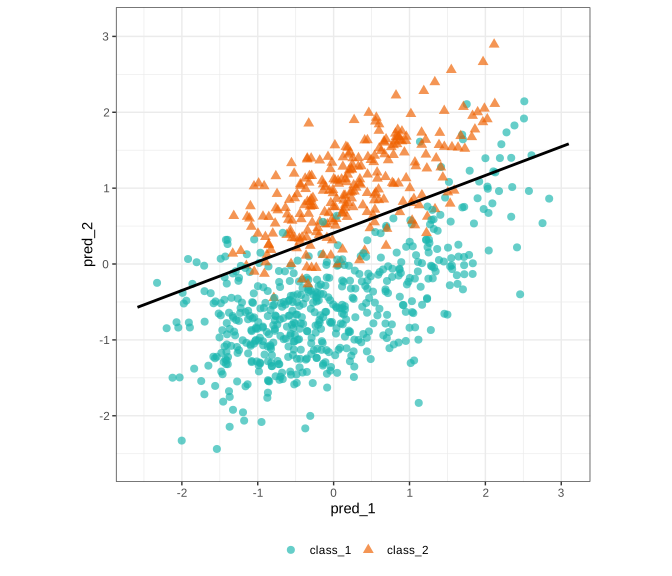
Logistic regression
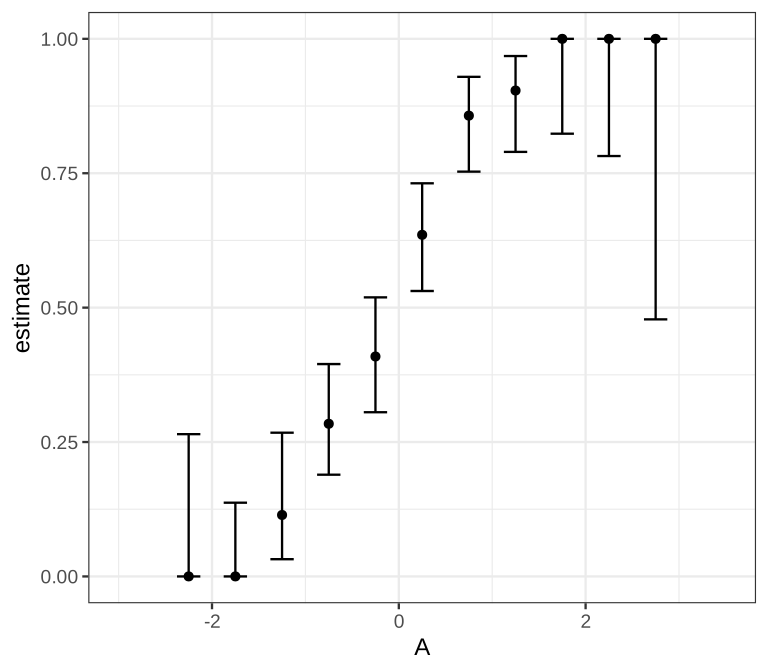
Logistic regression

Logistic regression
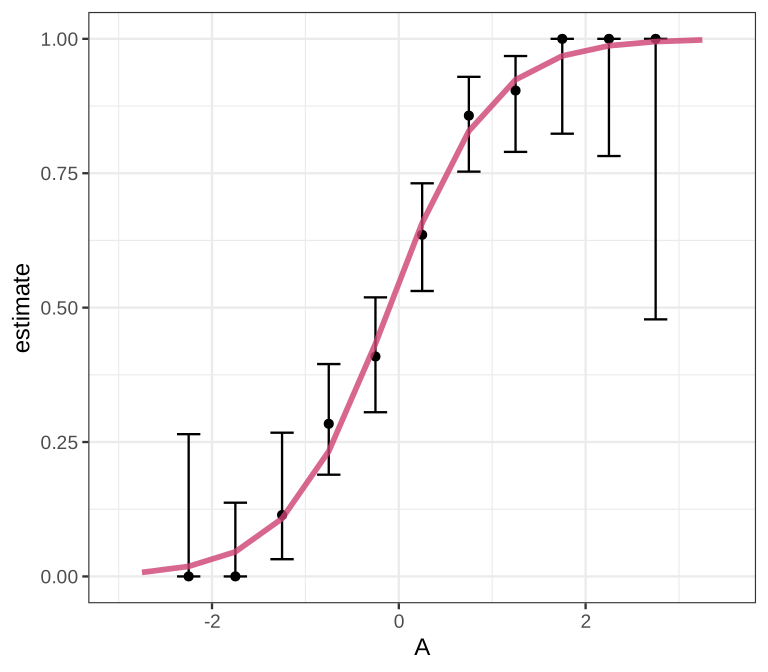
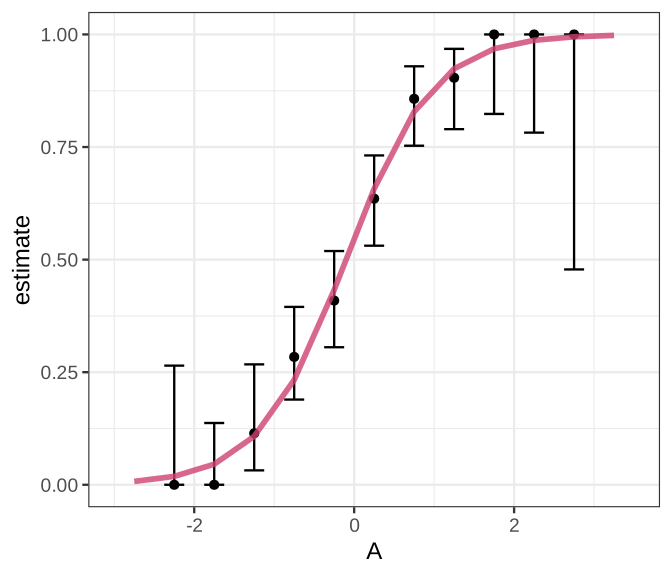
- Logit of outcome probability modeled as linear combination of predictors:
\(log(\frac{p}{1 - p}) = \beta_0 + \beta_1\cdot \text{A}\)
- Find a sigmoid line that separates the two classes
Decision trees
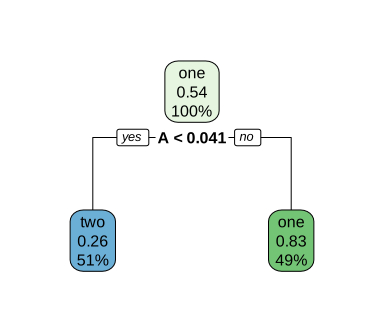
Decision trees

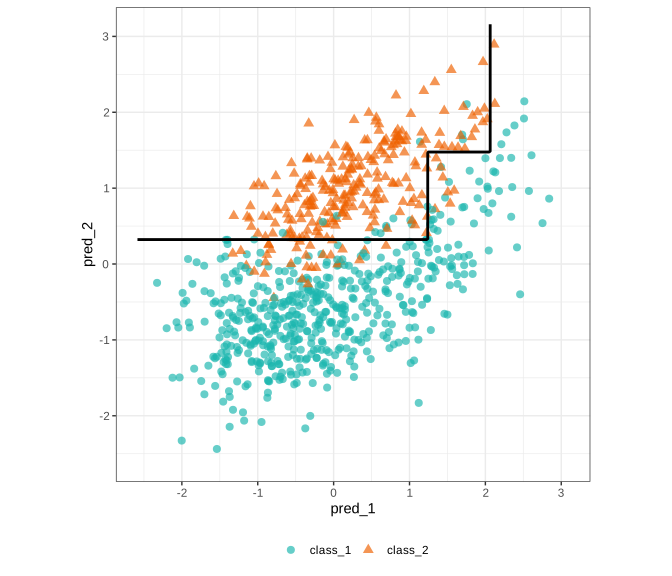
Series of splits or if/then statements based on predictors
First the tree grows until some condition is met (maximum depth, no more data)
Then the tree is pruned to reduce its complexity
Decision trees
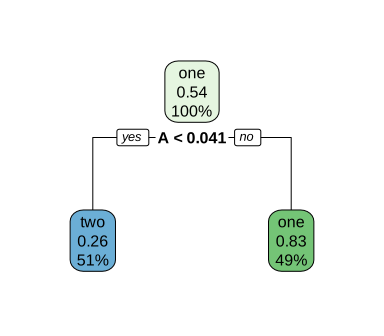
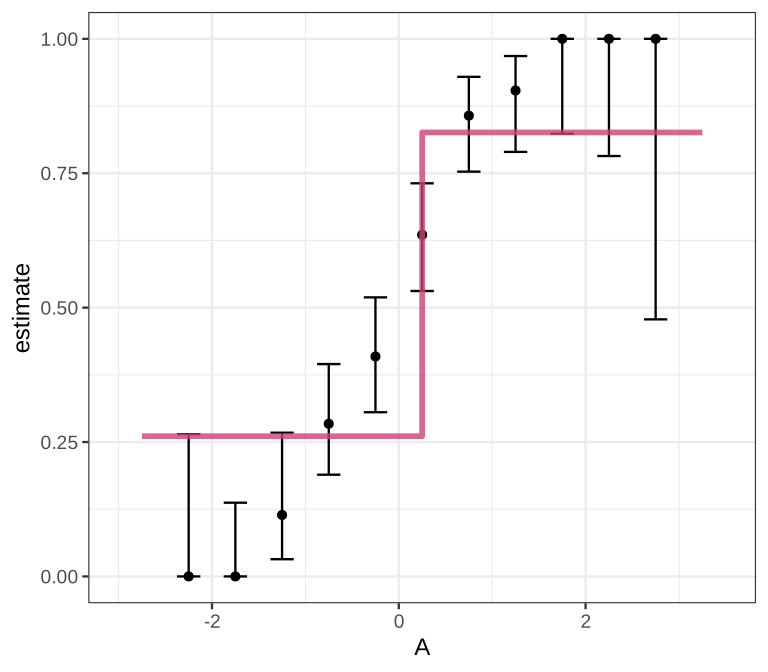
All models are wrong, but some are useful!
Logistic regression
Decision tree
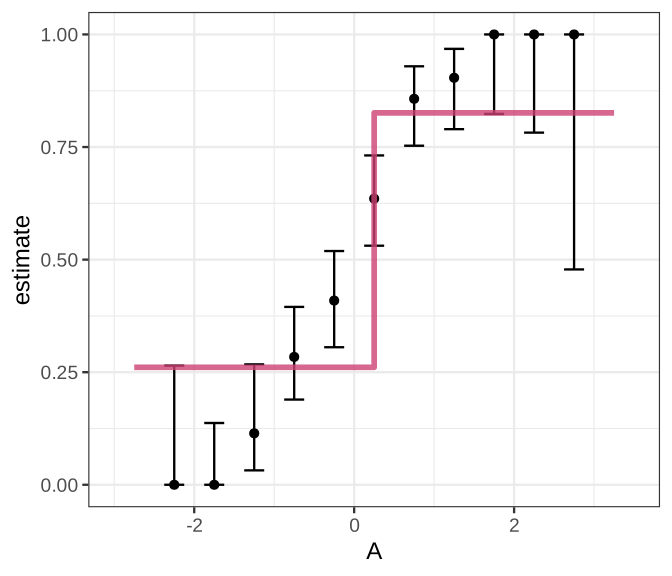
In two dimensions
Logistic regression
Decision tree
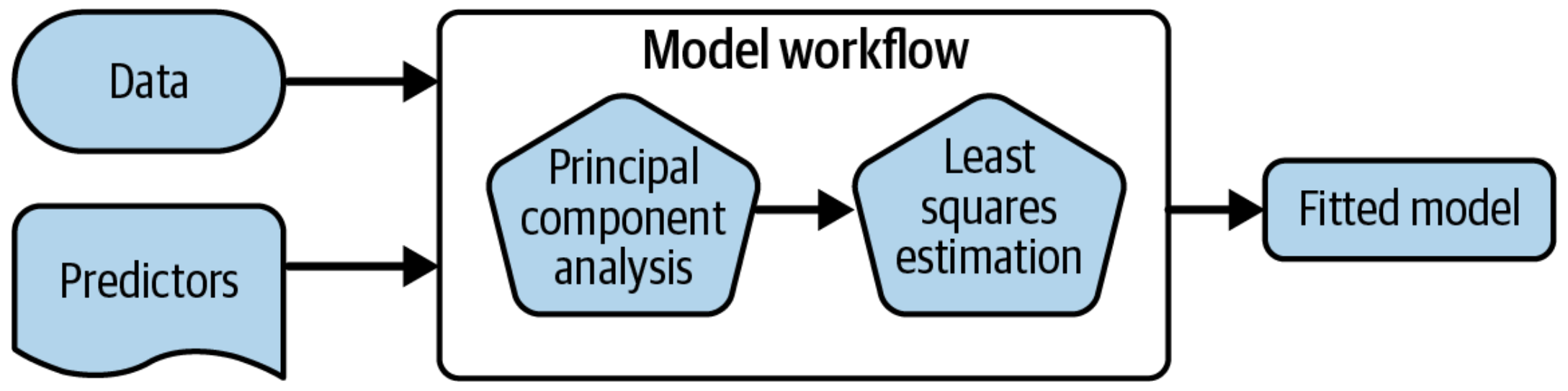
Workflows bind preprocessors and models
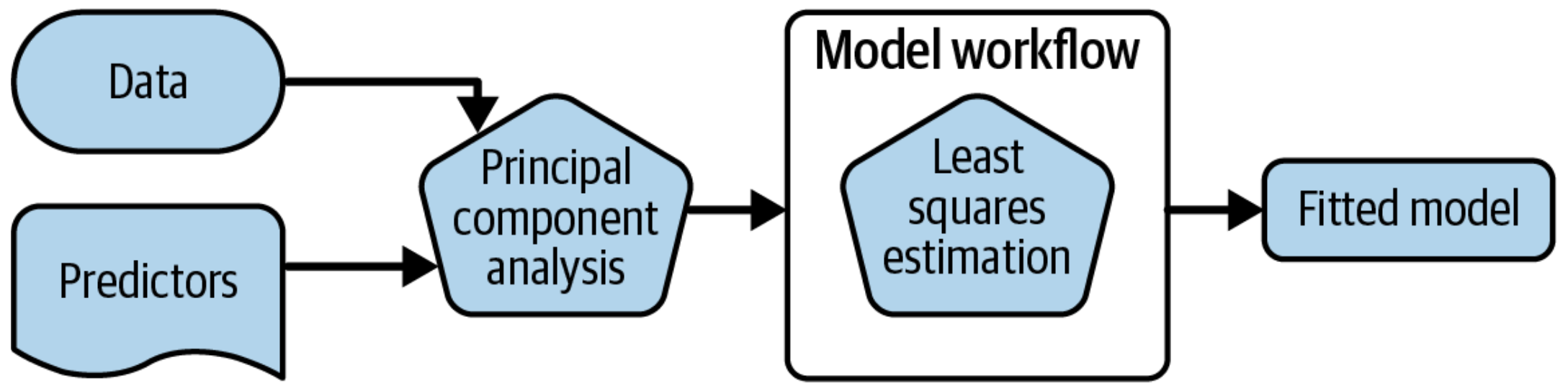
What is wrong with this?
Why a workflow()? ![]()

- Workflows handle new data better than base R tools in terms of new factor levels
- You can use other preprocessors besides formulas
- They can help organize your work when working with multiple models
- Most importantly, a workflow captures the entire modeling process:
fit()andpredict()apply to the pre/post processing steps in addition to the actual model fit
A model workflow ![]()
![]()
tree_spec <-
  decision_tree() |>
  set_mode("classification")

tree_spec |>
  fit(class ~ ., data = cls_train)
#> parsnip model object
#>
#> n= 800
#>
#> node), split, n, loss, yval, (yprob)
#>       * denotes terminal node
#>
#>  1) root 800 266 class_1 (0.66750000 0.33250000)
#>    2) pred_2< 0.3297983 510  30 class_1 (0.94117647 0.05882353) *
#>    3) pred_2>=0.3297983 290  54 class_2 (0.18620690 0.81379310)
#>      6) pred_1>=1.236161 71  28 class_1 (0.60563380 0.39436620)
#>       12) pred_2< 1.476946 42   7 class_1 (0.83333333 0.16666667) *
#>       13) pred_2>=1.476946 29   8 class_2 (0.27586207 0.72413793)
#>         26) pred_1>=2.070158 7   2 class_1 (0.71428571 0.28571429) *
#>         27) pred_1< 2.070158 22   3 class_2 (0.13636364 0.86363636) *
#>      7) pred_1< 1.236161 219  11 class_2 (0.05022831 0.94977169) *
A model workflow ![]()
![]()
tree_spec <-
  decision_tree() |>
  set_mode("classification")

workflow() |>
  add_formula(class ~ .) |>
  add_model(tree_spec) |>
  fit(data = cls_train)
#> ══ Workflow [trained] ════════════════════════════════════════════════
#> Preprocessor: Formula
#> Model: decision_tree()
#>
#> ── Preprocessor ──────────────────────────────────────────────────────
#> class ~ .
#>
#> ── Model ─────────────────────────────────────────────────────────────
#> n= 800
#>
#> node), split, n, loss, yval, (yprob)
#>       * denotes terminal node
#>
#>  1) root 800 266 class_1 (0.66750000 0.33250000)
#>    2) pred_2< 0.3297983 510  30 class_1 (0.94117647 0.05882353) *
#>    3) pred_2>=0.3297983 290  54 class_2 (0.18620690 0.81379310)
#>      6) pred_1>=1.236161 71  28 class_1 (0.60563380 0.39436620)
#>       12) pred_2< 1.476946 42   7 class_1 (0.83333333 0.16666667) *
#>       13) pred_2>=1.476946 29   8 class_2 (0.27586207 0.72413793)
#>         26) pred_1>=2.070158 7   2 class_1 (0.71428571 0.28571429) *
#>         27) pred_1< 2.070158 22   3 class_2 (0.13636364 0.86363636) *
#>      7) pred_1< 1.236161 219  11 class_2 (0.05022831 0.94977169) *
A model workflow ![]()
![]()
tree_spec <-
  decision_tree() |>
  set_mode("classification")

workflow(class ~ ., tree_spec) |>
  fit(data = cls_train)
#> ══ Workflow [trained] ════════════════════════════════════════════════
#> Preprocessor: Formula
#> Model: decision_tree()
#>
#> ── Preprocessor ──────────────────────────────────────────────────────
#> class ~ .
#>
#> ── Model ─────────────────────────────────────────────────────────────
#> n= 800
#>
#> node), split, n, loss, yval, (yprob)
#>       * denotes terminal node
#>
#>  1) root 800 266 class_1 (0.66750000 0.33250000)
#>    2) pred_2< 0.3297983 510  30 class_1 (0.94117647 0.05882353) *
#>    3) pred_2>=0.3297983 290  54 class_2 (0.18620690 0.81379310)
#>      6) pred_1>=1.236161 71  28 class_1 (0.60563380 0.39436620)
#>       12) pred_2< 1.476946 42   7 class_1 (0.83333333 0.16666667) *
#>       13) pred_2>=1.476946 29   8 class_2 (0.27586207 0.72413793)
#>         26) pred_1>=2.070158 7   2 class_1 (0.71428571 0.28571429) *
#>         27) pred_1< 2.070158 22   3 class_2 (0.13636364 0.86363636) *
#>      7) pred_1< 1.236161 219  11 class_2 (0.05022831 0.94977169) *
Your turn
Run the tree_wflow chunk in your classwork-03-what-makes-a-model.qmd.
Edit this code to make a workflow with your own model of choice.
Extension/Challenge: Other than formulas, what kinds of preprocessors are supported?
Predict with your model ![]()
![]()
How do you use your new tree_fit model?
Your turn
Run:
predict(tree_fit, new_data = cls_test)
What do you notice about the structure of the result?
Your turn
Run:
augment(tree_fit, new_data = cls_test)
How does the output compare to the output from predict()?
Understand your model ![]()
![]()
How do you understand your new tree_fit model?

Understand your model ![]()
![]()
How do you understand your new tree_fit model?
You can extract_*() several components of your fitted workflow.
⚠️ Never predict() with any extracted components!
Understand your model ![]()
![]()
How do you understand your new tree_fit model?
You can use your fitted workflow for model and/or prediction explanations:
- overall variable importance, such as with the vip package
- flexible model explainers, such as with the DALEXtra package
Learn more at https://www.tmwr.org/explain.html
Your turn
Extract the model engine object from your fitted workflow and check it out.
The whole game - status update